One Shot Film!

To begin One Shot Film, we were put into groups of four and given a brief for the project called ‘You Decide’. In the first week we made a practice one shot film that lasted one minute. We were given two areas where we could film, the grave yard or the auditorium. When thinking of rough ideas for our practice film, we decided to use the auditorium. Before filming we came up with a storyline, this was basically a tramp sat on a bench, then along comes a posh lady and sits next to the tramp. The tramp the walks away and the posh lady drinks the alcohol. After thinking of the storyline, we thought of different ways to how we could stand and move the camera, but only once. In the end we came to a decision which was starting off with the camera zoomed onto a bottle of vodka and then the camera zooms out onto the scene. We thought this would work well, as the audience could then realise what the prop was and grasp what kind of character the person acted who was holding the vodka.

For this we created a risk assessment. This included who could possibly be affected in the activity, but not only the people you’re working with. It also involves the general public and any other individuals. We also had to think about vulnerable people such as children and people with disabilities. As a result, we produced a risk assessment before undertaking the practice film.
We used a tripod and a panasonic video camera for the task. However we could only pan/zoom the camera once and the camera could not be moved or stopped at any time.
After a few attempts, we were happy with our outcome and went to edit the practice one shot using Adobe Premiere Pro. We presented our film to everyone and gathered feedback on what they liked and how it could be improved. From that, we could then take it into consideration when filming our final one shot film. For our final one shot film we can choose our own location and any storyline, hence the title ‘You Decide’ which I am looking forward to working on.
Practice One Shot Film:

http://vimeo.com/17333696

My Station Ident!

Over the past three weeks, I was commissioned to produce a thirty second station ident using 3D Studio Max. The ident had to be about you, for example your facebook, twitter or anything you enjoy, which then merged together to create an ident for your own TV channel.
Throughout the three weeks, we have had seminar lessons to learn 3D Studio Max. At first I thought it was difficult to get the hang of but with the understanding of the programme from the seminars, I was then able to learn some more techniques from tutorials on YouTube which helped me a lot.
For inspiration, I firstly looked at all the BBC, ITV, CHANNEL 4 idents to give me a few ideas. However I tend to be inspired by bright colours and cartoon styles in most work I do, which I thought would be great for this project. Therefore I researched various idents and clips with the similar styles to give me an insight for my own station ident.
(In the bibliography at the bottom are some links to my inspiration)

On the internet there is a lot of discussion whether tropes used in media are good or bad. My understanding of tropes is what TV writers, directors, actors and etc, use to control the audiences outlook. Tropes are often used to show fiction, which helps us to not just focus on the reality in life, which is why people think badly about different tropes they have seen.
Looking at semiotics and genre in some of the clips on the internet, I thought would be good to use these within my work to create something relatively abstract. This would most likely catch the audience’s attention to a large extent.

From researching and developing some inspiration, I came up with a few designs that I sketched. I then had to take into consideration, my ability of skills using 3D Studio Max to which I then finally came up with a completed design for my station ident. My final design is basically, a bright blue sky with clouds as the background, with bright bold letters ‘ADB’ which are my initials and then a bumble bee which fly’s around the screen. The design relates to me, because I love animals and bright colours. Which is why I thought a bright sky would work well for the background and I decided on a bumble bee because I personally think it would work well with the background and their cute, as strange as it might sound.
With the help from seminars classes and YouTube, I began producing my animation. There were a few ups and downs along the way, such as timing and pressing buttons I shouldn’t have pressed but in the end I was happy with my animation. The next step was to add sound using Adobe Premiere Pro. Sound is very important, especially for an animation or it could lose the audiences interest.
You could say the genre for my ident is for children so it could be classed as adventure, but when people watch my ident I assume they would most likely think it was for a cartoon TV channel or something similar.
I also use semiotics, this is the title of the TV channel ‘ADB’ and I also have a sign at the end which comes into the scene which says ‘Press red now’. I use different camera angles and animations to create them visually throughout the ident.

Bibliography

Inspiration

3D Studio MaxTutorials


My Station Ident (without sound):

http://vimeo.com/16214913

My Multimedia!

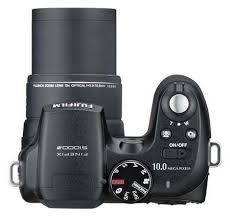
For my multimedia, I will discuss the one and only FUJIFILM S1000FD camera! I have had this camera for about two years now and I personally think it’s a great camera to work with.
I previously studied a national diploma in design at college. Part of the diploma was photography, therefore when I started the course I thought it would be a good idea to buy a decent camera. I was looking for a camera that had plenty of features such as optical zoom, macro, stabilisation and versatile shooting.
I researched various cameras on the Internet before I came to a decision, such as canon 550d, Nikon d3000 and many more. What also caught my eye were cameras that were compact but manageable to use, I thought this would be perfect for location photography.
 

In the end I found the Fujifilm s1000fd camera, where it had everything I needed and more. The camera is a small compacted (SLR style) digital camera, which had all the features I wanted, and also panorama shooting, red-eye removal, face detection and SUPER macro. It additionally had 10.0 mega pixels and 12x optical zoom, which was brilliant for such a small camera. It cost me around one-hundred and fifty pounds, which I thought was a reasonable price.
I was happy with the camera, it produced me quality photographs, it didn't give me any bother and I still use it to this day. I’m unlikely to buy a new camera, unless I need a new one or something better catches my eye. Nevertheless the design and features are great but I think the desire to buy the upgrade of the product isn’t as essential as it might be for products such as the iPhone. Yet, there are thousands of reasons to why this might be.
Overall I enjoy using my camera and I think it's worth every penny!

My Inspiration!

These are some images of inspiration that I would like to use towards my work in multimedia, sometime throughout the year. I think the images below would be great inspiration to use towards different character designs for animation. Each character also looks as though you can sense what kind of personality it might have if it was animated.   


I WISH.....

pen drawings 4

pen drawings 1

pen drawings 3


...I COULD DRAW LIKE THAT!

3D Animation!

To create various 3D animations I have used Autodesk 3D Max. Below are some short practice animations that I have done to just simply try and get the hang of the programme a bit better.


(One jump)


There will be more animations to add to this blog.